Filed under Resumes & Cover Letters
ATS Resume Formatting Rules That Work
Make your resume easy for Applicant Tracking Systems to read. Learn ATS-friendly fonts, layouts, headings, file types, and keyword tips that help your resume reach a human.
An Applicant Tracking System (ATS) is software many medium and large employers use to collect, parse, and sort resumes before a recruiter ever sees them. Your goal is simple: give the ATS clean structure, then give the human reader clear proof you can do the job.

How ATS software reads your resume
Most ATS tools try to extract your resume text and map it into fields like Name, Contact, Work Experience, Education, and Skills. If your layout is complicated, the ATS can scramble content, drop key details, or file your accomplishments under the wrong job.
That is why ATS-friendly formatting is mostly about predictable structure:
- Standard section headings
- Simple columns (ideally one)
- Clean fonts
- Bullets instead of decorative elements
- Text that stays text (not embedded in images)
ATS-safe formatting rules (the ones that actually help)
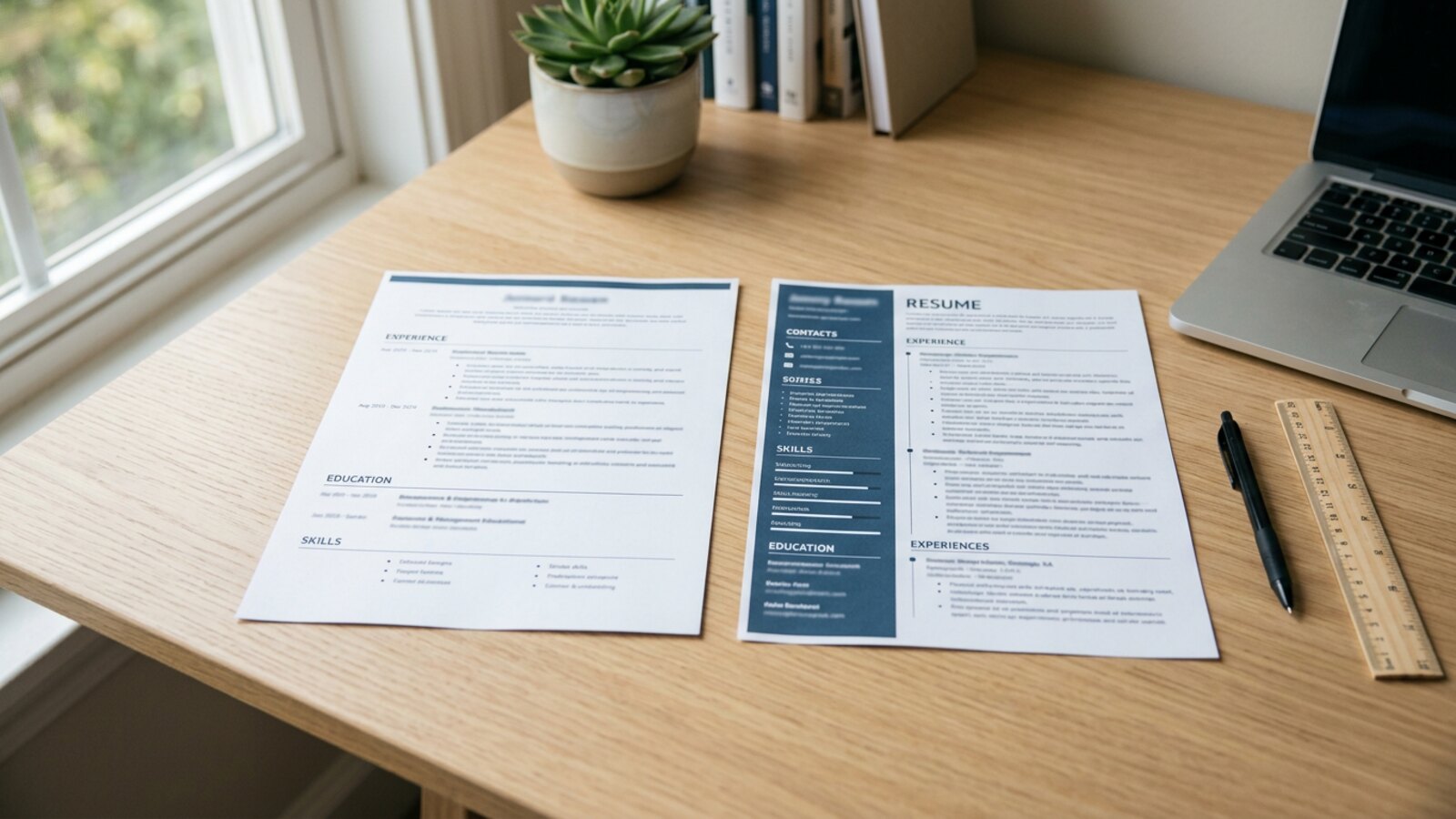
Use a simple, single-column layout
A one-column resume is the safest choice. Two-column designs can look gorgeous to humans and still parse unpredictably, especially when content flows in the wrong order.
- Best: One column from top to bottom.
- If you must use two columns: Keep the left column very narrow and nonessential (for example, a short skills list), and make sure the main experience stays in a normal reading order. Even then, one column is safer.
Stick to standard headings
ATS tools recognize common labels. These headings are reliably parsed:
- Summary or Professional Summary
- Work Experience or Professional Experience
- Education
- Skills
- Certifications (if relevant)
- Projects (if relevant)
Avoid cute headings like “Where I have been” or “My journey” on an ATS-friendly resume. Save the creativity for your cover letter.
If you need help with the message side of your application, you might like our hub on Resumes & Cover Letters.
Choose ATS-friendly fonts and sizes
Pick fonts that are common, clean, and easy to parse. Good choices include:
- Calibri
- Arial
- Helvetica
- Times New Roman
- Georgia
- Verdana
Simple rules that keep you readable:
- Body text: 10.5 to 12 pt
- Headings: 13 to 16 pt
- Name: 18 to 24 pt (still plain text)
- Line spacing: around 1.0 to 1.15, with a little breathing room between roles
Use standard bullet points and minimal styling
Bullets are great for both ATS parsing and human scanning. Keep them simple:
- Use round bullets (•) or hyphens (-).
- Avoid special symbol bullets that can turn into strange characters when parsed.
- Use bold for job titles or company names, but skip heavy underlining or decorative text effects.
Be careful with tables, text boxes, and icons
These are common ATS troublemakers:
- Tables: can shuffle text order or hide content.
- Text boxes: often get ignored or read out of sequence.
- Icons: look nice but can replace important words, especially in your contact info.
Instead of an email icon, just write your email address as text. Same for phone and LinkedIn.
Keep your contact info simple and complete
Your header should be plain text, near the top, with:
- Name
- Phone number
- Email address
- City and state (full address usually not needed)
- LinkedIn URL or portfolio URL (if relevant)
Avoid putting contact details in the page header or footer area in your word processor. Some systems miss them.
Choose the right file type: PDF vs DOCX
This depends on the employer’s instructions:
- If the job posting says “PDF”: submit a PDF.
- If it says “Word” or “DOCX”: submit DOCX.
- If it does not specify: DOCX is often the safest for parsing, but a clean, text-based PDF exported from Word or Google Docs is usually ATS-readable too. Scanned PDFs and image-based PDFs are not.
Whichever format you pick, double-check that the text can be selected and copied. If you cannot highlight your resume text, that is a red flag that the ATS may not be able to read it reliably.
Name your file like a professional
Make it easy for a recruiter to find your document later:
- FirstName_LastName_Resume.docx
- FirstName_LastName_Resume.pdf
Avoid: “Resume FINAL REALLY FINAL v7.pdf”.
Keyword strategy: get past filters without sounding like a robot
Many hiring workflows rely on keyword matching and recruiter search, and some setups also rank resumes based on how well they match the job description. The trick is to use the right words in a natural way.
Where to pull keywords from
- The job title and department
- Required skills (software, tools, methods)
- Responsibilities (verbs and tasks)
- Qualifications (certifications, degrees, years of experience)
- Industry terms (standards, frameworks, regulations)
Where to place keywords (high-impact areas)
- Summary: 2 to 4 core keywords that define your fit.
- Skills section: a clean list of tools and competencies.
- Experience bullets: show the keyword in action, tied to outcomes.
- Certifications: exact names matter.
Use exact phrasing, plus common variations
If a posting says “Customer Relationship Management (CRM),” you can include both:
- Customer Relationship Management (CRM)
- CRM tools: Salesforce, HubSpot (only if true)
This same approach works for acronyms across industries: “Search Engine Optimization (SEO),” “Electronic Health Record (EHR),” or “Enterprise Resource Planning (ERP).” Spell it out once, include the acronym, then use whichever version appears in the posting.
Do not stuff keywords in a list that you cannot support. Humans notice. Fast.
Avoid keyword stuffing and hidden text
Do not try to game the system with tricks like repeating the same keyword 30 times, adding long keyword lists in a footer, or using white text on a white background. It can backfire with both software and humans, and it can look like you are hiding something.
If a skill matters, use it once in your Skills section and once in a bullet where you actually used it.
Write achievement bullets that help both ATS and people
ATS likes relevant terms. Recruiters like proof. Combine both with a simple pattern:
- Action verb + what you did + tool or skill + result
Examples:
- Managed a 40+ account portfolio using Salesforce, improving renewal rate by 12%.
- Built weekly KPI reports in Excel and presented insights to leadership, reducing order errors by 18%.
- Coordinated cross-functional onboarding for 25 new hires, cutting time-to-productivity by 2 weeks.
- Documented incidents in an EHR and coordinated follow-ups with the care team, improving appointment confirmation rates by 15%.
Headings, dates, and job entries: make parsing easy
Use a consistent job format
For each role, keep the pattern consistent so both machines and humans can follow it:
- Job Title, Company Name, City, State
- Month Year to Month Year (or Month Year to Present)
- 3 to 6 bullets focused on results
Pick one date style and stick with it
Choose a format like:
- Jan 2023 to Mar 2025
- January 2023 to March 2025
- 2023 to 2025 (less detailed, but acceptable)
Avoid mixing formats across roles.
Keep headings simple
Avoid stylized section titles and separators like “Experience | Skills” or “Work Experience: Highlights” if it makes your headings harder to recognize. Plain labels work best: Work Experience, Education, Skills.
Avoid visual timelines
Graphics, progress bars, and visual timelines can confuse ATS parsing. If you want to show growth, do it with promotions clearly listed as separate entries or clearly labeled under one company.
What to remove for maximum ATS compatibility
- Photos, headshots, and avatars
- Logos and decorative images
- Skill bars, star ratings, and “meter” graphics
- Text inside shapes or callout bubbles
- Overdesigned headers with multiple text blocks
- Footers packed with key info (some ATS ignore footers)
If you are applying internationally, note that photo expectations vary by country. When in doubt, follow the norms for the location and industry you are targeting.
A quick ATS self-check you can do in minutes
1) The copy and paste test
Copy your resume text and paste it into a plain text editor. Ask:
- Is the order correct?
- Are job titles and companies still attached to the right roles?
- Did bullets turn into weird symbols?
- Did contact info stay intact at the top?
2) The “human skim” test
Now look at the formatted version again. In 10 seconds, can someone find:
- Your current or most recent title
- Your most relevant skills
- Recent, measurable outcomes
If the answer is no, simplify the layout and tighten the top third of the page.
3) Match your resume to the posting
Without copying the job description, make sure your resume includes the same language for the key requirements, especially tools, certifications, and role-specific tasks.
4) Re-check after export (especially from Google Docs)
If you draft in Google Docs or another editor, export to DOCX or PDF and review the final file. Sometimes bullets, special characters, or spacing shift during export. If anything looks odd, simplify the formatting and export again.
Common ATS mistakes (and easy fixes)
Mistake: Using a fancy template with columns and boxes
Fix: Switch to a clean, single-column layout with standard headings.
Mistake: Listing skills you never use in your bullets
Fix: Support key skills in your experience section with one or two proof bullets.
Mistake: Writing a summary that is too vague
Fix: Add 2 to 3 job-specific keywords, plus one measurable strength. Example: “Project coordinator with 4+ years supporting cross-functional launches, scheduling, vendor management, and status reporting.”
Mistake: Using unusual section titles
Fix: Rename them to standard ones like Work Experience, Education, Skills.
Mistake: Submitting a PDF the ATS cannot read
Fix: Use a text-based PDF export, not a scanned or image-based file. If you are unsure, submit DOCX when allowed.
Pair your ATS-friendly resume with a clear cover letter
An ATS-friendly resume helps you get found. A thoughtful cover letter helps you stand out once a human is reading.
- If you are keeping it brief, visit Short-Form Cover Letters.
- If you are emailing your application, see How to Format a Job Application Email.
- If you are ending your letter and getting stuck on the last line, try How to End a Job Application Letter.
ATS resume FAQ
Do ATS systems reject resumes automatically?
Some do. Many more route, categorize, and make it easy for recruiters to search for matches. Clean formatting and relevant keywords help you land in the right pile.
Is a one-page resume required for ATS?
No. ATS tools can handle multiple pages. The better question is whether a human wants multiple pages for your level. Early career candidates often do well with one page, while experienced professionals may need two.
Can I use color?
A little, yes, but keep it subtle and never rely on color to communicate meaning. Black text on a white background is the most dependable.
Should I include a skills section even if I have strong experience?
Usually, yes. A skills section helps keyword matching and helps recruiters scan quickly. Keep it honest and targeted.
The short version
- Layout: Use a simple, single-column resume with standard headings (Summary, Work Experience, Education, Skills).
- Fonts: Pick common fonts (Calibri, Arial, Times New Roman, Georgia) in 10.5 to 12 pt body text. Keep styling minimal.
- Avoid: Tables, text boxes, icons, logos, photos, skill bars, and text in images.
- Contact info: Put it in plain text at the top (name, phone, email, city/state, LinkedIn or portfolio if relevant).
- File type: Follow the posting. If unspecified, DOCX is often the safest, and a clean text-selectable PDF is usually fine.
- Keywords: Pull skill and tool terms from the job description and use them naturally in Summary, Skills, and experience bullets.
- Bullets: Write achievement bullets with action + task + tool/skill + result (numbers help).
- Quick test: Copy and paste your resume into a plain text editor. If the order or headings break, simplify the format.
 Written by JotPublished · Last updated
Jot is the pencil-carrying mouse drawn for Letter Samples. Newer guides go out under Jot's name. Jot isn't a lawyer, a recruiter or an HR department, so check anything formal against your employer's policy or local law. Who is Jot?